
By Bill Mann
In Outlook 2007, Microsoft introduced the concept of To-Do's. These are similar to, but distinct from Tasks, and have caused no end of confusion for people. If you're one of the many people who is unsure about the difference between these two aspects of Outlook 2007, stick around. By the end of this article, we'll have the confusion cleared up.
In the beginning, there were Tasks
In the beginning, there were Tasks. A Task is a particular type of Outlook item used to track something that must be done. Tasks are designed for tracking and managing things you need to do. You can assign a Task start and end dates, set a recurrence pattern, track its status, give it a priority, record additional details in defined fields, send status reports, even assign the Task to another person.
"To-Do's are new critters that appeared in Outlook 2007."
To-Do's are new critters that appeared in Outlook 2007. A To-Do is an Outlook item that has been marked as requiring some sort of action in the future. To-Do's don't automatically have the special abilities of Tasks. They don't have start and end dates, recurrence patterns, and so on. All they are is items that are marked as requiring some sort of action in the future.
To-Do's are not particular types of Outlook items. An email message can be a To-Do. A Contact item can be a To-Do. And, to make things totally confusing, Tasks are always To-Do's since by definition, Tasks require some sort of action in the future. But a To-Do isn't always a Task.
No wonder people are confused.
Fortunately, it isn't too hard to clear this up. Again, a To-Do is an Outlook item that is marked as requiring some sort of action in the future.
The Follow Up flag
Items are marked as To-Do's by setting their Follow Up flags. Follow Up flags are attributes of Outlook items that are a lot like reminders. Right-click an Outlook 2007 item, and you will see Follow Up in the shortcut menu that appears. Clicking Follow Up opens the menu in Figure A.
FIGURE A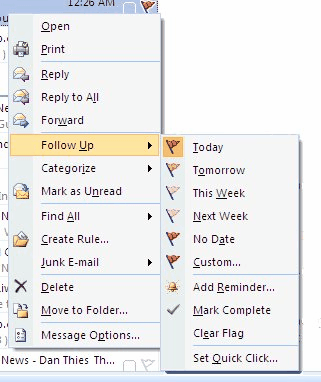
The Follow Up menu in Outlook 2007 has some interesting features. (click for larger image)
As you can see in the menu, you can set a Follow Up flag for a particular day, even attach a reminder to the item to remind you to follow up. If that flag is set, the item is a To-Do, regardless of whatever else it might be. That's why a Task is always a To-Do, but a To-Do is not always a Task. Tasks always have their Follow Up flags set, even if they are set to a value of No Date, meaning you haven't set a specific date for the task to be completed.


