
By David Gewirtz
Mathew Haikali, National Director of MISA Namibia writes:
I'm using Microsoft Outlook 2000 and any send message with attachment has it (winmail.dat) and the recipient does not read and receive the attachment because of winmail.dat. How can I resolve this situation?
We normally try to answer reader questions in something resembling first-come, first-serve basis. But MISA Namibia has such an important mission, we decided to help as quickly as we could. MISA is the Media Institute of Southern Africa, and their mission is "Promoting Media Diversity, Pluralism, Self-Sufficiency and Independence". They describe their vision as:
The vision of MISA Namibia is to assist in creating an environment of media freedom that promotes independence, diversity of opinion, financially viable media and professionalism.
Here at ZATZ Publishing, we believe media freedom is key to creating an informed and self-empowered populace. While we're not fighting the tough fight Mathew is, we can at least answer his question.
Understanding winmail.dat
The winmail.dat file is created by Outlook and is meant to be read by another Outlook user who receives the message. This only happens when you're sending a message in Rich Text format or HTML. Outlook generates this file, which contains formatting and other message information (including attachments) and attaches it to the message.
Other email clients don't use the winmail.dat format. It's most likely, when Mathew sends an email to another user, that user is not using Outlook. Rather than getting a nicely formatted message with the appropriate attachments, all the user gets is an incomprehsible winmail.dat file.
Fixing the problem
If you do get a winmail.dat file and you need to read what's inside, there is a program that will help. WMDecode is a $10 download, available from http://www.biblet.com that decodes the winmail.dat files. If you just need to extract one file, you can download a free version of the program that expires in a month.
If you're sending email that's causing your recipients to get winmail.dat files, the easiest thing to do is set your mailing format to Plain Text. Your recipients' clients won't need to figure out what this weird file is, and they should be able to read your attachments without any problems.
If you want to make sure you're always sending mail in Plain Text format by default, select Options from the Tools menu, click the Mail Format tab, and set the Message format drop-down menu to Plain Text, as shown in Figure A.
FIGURE A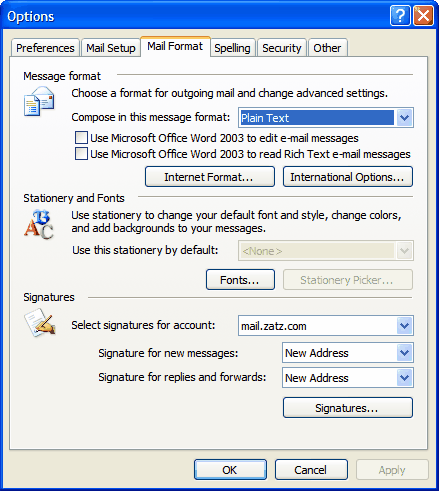
Set your Message format to Plain Text. (click for larger image)
Your dialog may be slightly different from the one above. I'm using Outlook 2003 to capture this image, but the idea is the same regardless of which version of Outlook you're running.


