
By Dee White
Outlook makes it easy to add contacts from emails that you receive. Just open the email, right click on From and select Add to contact. The sender's name and email address are added to your Outlook Address Book. But what if there is an email signature at the bottom of the email with the sender's phone number, Web site, address -- all information that you would also like to have in your Outlook contacts data?
Do you want to retype it all or even cut and paste, field-by-field?
AddressGrabber Basic is a productivity utility that will easily set up contacts for you in Outlook from email signatures, Web sites, lists, documents and more. This utility will also quickly set up contacts for you in Shipwire, Jigsaw, and Plaxo from the sources above as well as from Outlook. And, it's free!
AddressGrabber Basic is the latest offering from the great folks at eGrabber. They have perfected the "smart grabbing" technology for Outlook along with many other popular office programs such as ACT!, GoldMine, salesforce.com and QuickBooks. If you're a contact-oriented user, you'll quickly appreciate the simplicity of this program and even more quickly find it an indispensable part of your day-to-day routine.
One example: you are on a Web site, you select "Contact Us". Up comes a screen with a name, email address, physical address and phone number. Open up AddressGrabber Basic (or do like me and have it on your Start menu). Highlight the contact information on the Web page. Click the Grab button on the AddressGrabber toolbar, as shown in Figure A.
FIGURE A
AddressGrabber Basic is a toolbar that launches instantly.
In seconds, a verification screen like that shown in Figure B will pop up, populated with the information that you have highlighted.
FIGURE B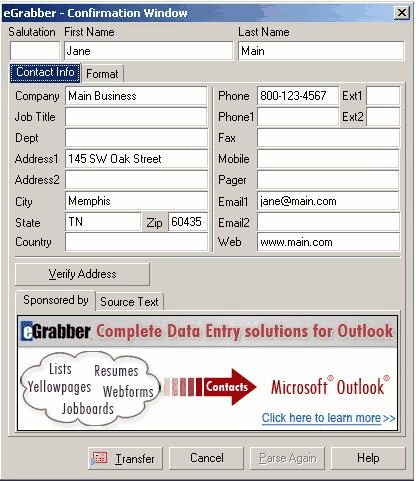
Immediately after highlighting contact information and selecting Transfer, this verification screen appears. (click for larger image)
At this point, you will be asked to verify the address on the screen. If it all looks correct (and I have not run across a bad transfer yet), you simply click the Transfer button and you have a new contact added in Outlook. You clicked on your mouse exactly three times.
AddressGrabber Basic is easy to use, saves a lot of time and it's free.
Dee White is part of the team at the AddOn Store, located on the Internet and in Portland, Oregon. The AddOn Store features addons for Outlook, ACT! and GoldMine. For more information, visit http://www.addonstore.com.


